





Flutter Testing, Security & DevOps: 18 Key Interview Questions
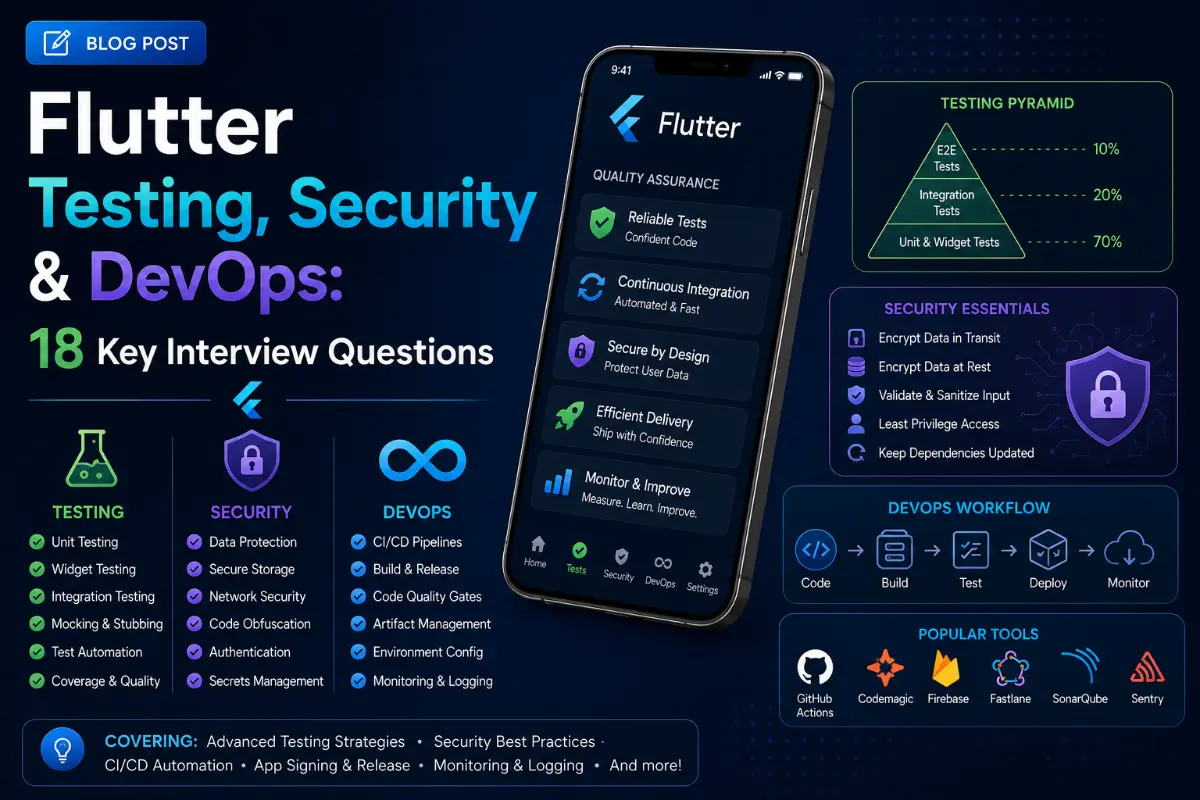
Developing features in Flutter is only half the battle. Delivering a secure, fully tested, and automatically deployed app requires strong DevOps and testing foundations. This guide covers 18 critical questions asked during senior and lead-level engineering interviews.
Questions Quick Links
- Q1. Testing Pyramid in Flutter
- Q2. Mocking Databases & APIs
- Q3. Finding Widgets in Tests
- Q4. Golden Tests Explained
- Q5. Simulating User Inputs
- Q6. pump() vs pumpAndSettle()
- Q7. Setting up Build Flavors
- Q8. Code Obfuscation in Production
- Q9. Android APK vs AAB
- Q10. iOS Provisioning & App Store
- Q11. Fastlane Integration
- Q12. CI/CD Pipeline Setup
- Q13. Firebase Crashlytics & Sentry
- Q14. Universal Links & App Links
- Q15. Secure Storage Practices
- Q16. Deferred Loading
- Q17. pubspec.yaml Versioning
- Q18. Custom Analyzer Guidelines
Q1. What is the testing pyramid in Flutter? Explain Unit, Widget, and Integration tests.
Answer:
- Unit Tests: Test a single function, method, or class. Runs extremely fast on the local machine without starting any UI. Command:
flutter test test/unit_test.dart. - Widget Tests (Component Tests): Instantiates widgets in an isolated test environment (off-screen) to verify their visual hierarchy, layout boundaries, and user reactions. Command:
flutter test test/widget_test.dart. - Integration Tests: Test the entire application working together. Spawns the app on a real device or emulator and exercises flows. Command:
flutter drive --target=test_driver/app.dart.
Q2. How do you mock network requests or databases in Flutter tests?
Answer:
You must isolate network requests during tests to ensure consistent, offline results. Using mocktail is the modern standard for writing mocks.
import 'package:mocktail/mocktail.dart'; import 'package:flutter_test/flutter_test.dart'; class MockHttpClient extends Mock implements HttpClient {} void main() { test('returns data on success', () async { final client = MockHttpClient(); when(() => client.get(any())).thenAnswer((_) async => Response('{"id": 1}', 200)); // execute assertion... }); }
Q3. How do you find widgets and verify their presence in Widget tests?
Answer:
You use `Finder` classes accessed via the global `find` variable. Common finders:
find.text('Save'): Finds widgets displaying a specific text string.find.byType(ElevatedButton): Finds widgets by their class type.find.byIcon(Icons.add): Finds icon displays.find.byKey(const Key('submit-btn')): Best practice for targeted widget tests.
Q4. What are Golden Tests in Flutter and how do they work?
Answer:
Golden Tests are visual regression tests. Flutter renders a widget to a high-resolution image (a "Golden file") and compares it pixel-by-pixel with a previously approved master image. If a layout constraint changes and shifts a button by even one pixel, the test fails, highlighting rendering jank or layout degradation.
Q5. How do you simulate user actions (tapping, entering text) in Widget tests?
Answer:
You use the `WidgetTester` object methods:
await tester.enterText(find.byType(TextField), 'hello');: Inputs text.await tester.tap(find.byKey(const Key('login-btn')));: Simulates tap clicks.await tester.drag(find.byType(ListView), const Offset(0.0, -300.0));: Simulates scroll actions.
Q6. Explain the purpose of tester.pump() vs. tester.pumpAndSettle().
Answer:
tester.pump(Duration duration): Advances the virtual clock by a single frame or specific duration to trigger a state rebuild.tester.pumpAndSettle(): Repeatedly callspump()with short intervals until there are no more scheduled frames in the animation channel. Use this to wait for navigations, fade transitions, and long animations to fully finish.
Q7. How do you configure Build Flavors in Flutter?
Answer:
Flavors allow separation of databases and server endpoints (Dev, Staging, Production).
- Android: Configure
productFlavorsinandroid/app/build.gradle. - iOS: Set up custom configurations (Schemes) in Xcode.
- Execution: Run
flutter run --flavor staging -t lib/main_staging.dart.
Q8. What is App Obfuscation in Flutter? How and why do you run it?
Answer:
Obfuscation compiles human-readable identifiers into random symbols, preventing reverse engineering of your binary. Build with: flutter build apk --obfuscate --split-debug-info=/.
Q9. Compare Android APKs vs. Android App Bundles (AAB).
Answer:
An APK (Android Package) contains files for all supported screen densities and CPU architectures. An AAB (Android App Bundle) is a publishing format uploaded to Google Play. The store automatically generates dynamically optimized APKs for each user's device, saving up to 50% download file size.
Q10. How do iOS code signing, provisioning profiles, and TestFlight uploads work?
Answer:
Xcode uses certificate keys to sign code. You configure an App ID, provisioning profile, and bundle identifier on Apple Developer Portal, execute flutter build ipa to package the archive, and upload it via Transporter/Xcode to TestFlight for release.
Q11. What is Fastlane, and how does it automate Flutter building?
Answer:
Fastlane is a tool to automate build distribution. Running a lane runs commands (like building IPAs/AABs, signing profiles, and calling the App Store Connect APIs) in a single terminal line: fastlane deploy_staging.
Q12. How do you set up a Flutter CI/CD pipeline on GitHub Actions?
Answer:
You create a YAML configuration under .github/workflows/ to check out code, configure Java and Flutter environment keys, run unit tests, build deployment binaries, and push to store systems.
Q13. How do you integrate crash reporting libraries (Crashlytics/Sentry)?
Answer:
Initialize the SDK at startup, and pass uncaught exceptions: FlutterError.onError = FirebaseCrashlytics.instance.recordFlutterFatalError;.
Q14. Explain Deep Linking vs. App Links/Universal Links in Flutter.
Answer:
Deep Linking opens apps using custom schemes (e.g. myapp://path). Universal Links (iOS) and App Links (Android) use standard HTTPS links (e.g. https://domain.com/path) verified against a file on your server (like assetlinks.json), preventing spoofing.
Q15. How do you securely store API keys and credentials?
Answer:
Use flutter_secure_storage to write keys directly to iOS Keychain or Android Keystore (encrypted storage). Never commit credentials to plain code files.
Q16. How does deferred loading (code splitting) work in Flutter?
Answer:
You declare libraries as deferred as <name>. Flutter loads that package dynamically only when required, minimizing initial load footprint.
Q17. What is semantic versioning in Flutter?
Answer:
Defined in pubspec.yaml (e.g. version: 2.1.0+4). `2.1.0` is the semantic app release version, while `4` is the incremental build number used by app stores.
Q18. How do you write a custom analyzer configuration to enforce code guidelines?
Answer:
Create an analysis_options.yaml file at the root. Enable rules (like always_declare_return_types, avoid_empty_else, etc.) to keep layouts consistent across developers.
Written by DevOps & Security Lead
Senior Career Advisor & Recruitment Specialist at JobPortalConnect. With years of experience in HR matching, they review resumes, optimize career pathways, and interview recruiting partners directly.