




Android’s Evolution: From Operating System to Intelligence System
Android’s Evolution: From Operating System to Intelligence System
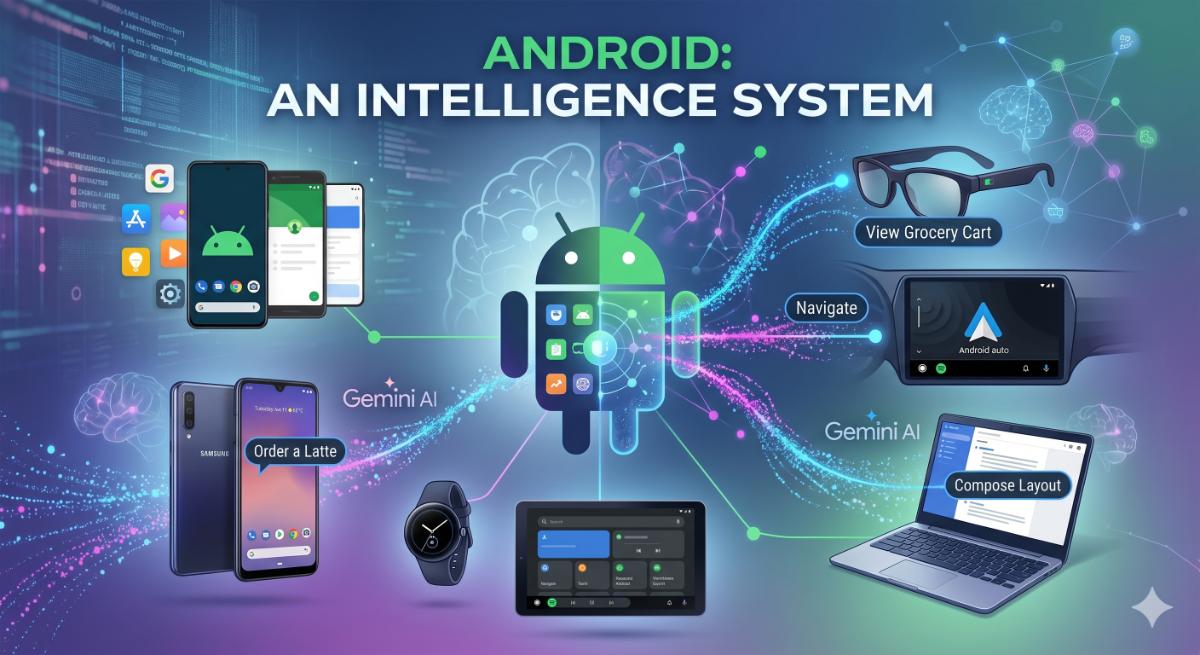
Android is no longer just an operating system that launches apps—it’s becoming an intelligent execution layer capable of understanding intent, coordinating services, and completing actions on behalf of users. With the deep integration of Gemini AI across phones, cars, wearables, foldables, and XR devices, Google is redefining how people interact with software.
Instead of users manually navigating through menus and screens, Android is evolving into a proactive assistant that understands context, predicts needs, and performs multi-step tasks autonomously.
This transformation marks one of the biggest shifts in computing since the smartphone revolution itself.
🤖 Task Automation with Gemini
Google is dramatically expanding Gemini’s ability to interact with apps and complete real-world workflows without constant user intervention.
Hands-Free Logistics
Gemini can now handle multi-step actions across apps automatically.
Imagine saying:
“Order my usual iced vanilla latte from the nearest café and have it ready in 15 minutes.”
Instead of opening multiple apps manually, Gemini can:
• Detect your preferred café
• Open the food delivery app
• Select your saved order
• Apply payment preferences
• Confirm pickup timing
• Send navigation to Android Auto
This creates a true “intent-driven” experience where users focus on outcomes instead of interfaces.
Real Example: Grocery Shopping Automation
Suppose you maintain a shopping list in Google Keep or another notes app.
You can simply say:
“Buy everything from my weekend BBQ list.”
Gemini can intelligently:
• Read the shopping list
• Match products in a grocery delivery app
• Add substitutes for unavailable items
• Apply coupons automatically
• Schedule delivery during your free hours
This is especially powerful for busy professionals, parents, and elderly users who want frictionless digital assistance.
Zero Engineering Required for Businesses
One of the most important shifts is that developers don’t need to build massive AI systems from scratch.
Apps simply expose structured capabilities, while Gemini handles orchestration.
For example:
• A food delivery app only needs menu APIs
• A taxi app exposes ride-booking actions
• A ticketing app exposes reservation flows
Gemini handles the conversational layer automatically.
This means even smaller startups can benefit from AI-powered discovery and automation without building their own large language model infrastructure.
Expanding Beyond Smartphones
Google is extending this intelligence layer across:
• Foldables
• Smartwatches
• Cars
• XR Glasses
• Tablets
• Android-powered laptops
For example:
A user could begin searching for a restaurant on their phone, continue navigation in Android Auto, and receive smartwatch notifications when the order is ready—all powered by the same AI context.
🛠️ Precision Control with AppFunctions
While Gemini offers high-level automation, Android is also introducing AppFunctions for developers who want precise control over how AI interacts with their apps.
This framework acts as a bridge between applications and AI agents.
Standardized AI-Ready Actions
Developers can now define:
• What actions the app supports
• What data can be accessed
• What permissions are required
• How natural language maps to app functions
Instead of AI “guessing” how an app works, developers explicitly describe capabilities.
Real Example: Messaging Apps
A messaging app can expose functions like:
• Send message
• Start voice call
• Share location
• Schedule meeting reminder
So users can say:
“Message Rahul that I’ll arrive in 20 minutes.”
Gemini understands the intent, selects the correct app function, and executes it instantly.
MCP-Like Integration
This approach is similar to the Model Context Protocol (MCP), where AI agents dynamically discover available tools and execute tasks safely.
The result is a more reliable AI ecosystem where applications become “AI-native.”
Early Success Stories
Apps like KakaoTalk have already demonstrated seamless:
• Voice calling
• Messaging
• Contextual actions
through Android’s intelligence framework.
This signals a future where apps are no longer isolated silos but cooperative services within a unified AI ecosystem.
📊 Next-Gen Widgets & User Experience
Widgets are evolving from static information panels into intelligent, adaptive mini-applications.
Google is redesigning widgets for richer interactions, smoother animations, and AI-generated customization.
Jetpack Glance & RemoteCompose
Android’s new UI framework enables:
• Particle animations
• Snap-scrolling effects
• Adaptive layouts
• Expressive buttons
• Smooth transitions
while remaining battery efficient.
Real Example: Fitness Widget
A fitness app widget could now:
• Animate daily step progress
• Expand dynamically during workouts
• Show live heart-rate visuals on Wear OS
• Provide gesture-based quick actions
without launching the full app.
This creates lightweight but immersive interactions directly from the home screen.
“Create My Widget” with Gemini
Users can simply describe what they want:
“Create a productivity widget with calendar, weather, and task reminders.”
Gemini can automatically generate:
• Layout
• Responsive sizing
• Color adaptation
• Interactive elements
for phones, tablets, and watches.
Real Example
A student could generate:
• Class schedule widget
• Assignment tracker
• Pomodoro timer
• Attendance counter
without writing any code.
This democratizes UI personalization for non-technical users.
Backward Compatibility Matters
• Android 16 gets full capabilities
• Older devices receive gracefully degraded experiences through Jetpack Glance
This is crucial because Android’s ecosystem still includes millions of legacy devices globally.
💻 Building Beyond the Smartphone
Android is no longer centered around phones.
Google’s ecosystem now spans:
• Foldables
• XR headsets
• Smart glasses
• Automotive systems
• Tablets
• Large-screen laptops
Developers must now build adaptive experiences that fluidly scale across multiple form factors.
🚀 Jetpack Navigation 3
Google is simplifying advanced navigation and UI transitions.
Key Features
• Scene decorators
• Shared element transitions
• Better state handling
• Adaptive navigation structures
Real Example
An e-commerce app on a foldable device could:
• Show product lists on one screen half
• Display detailed previews on the other half
• Animate products seamlessly into checkout flow
This creates premium tablet-like experiences on Android devices.
🎨 Jetpack Compose 1.11
Compose continues becoming Android’s future UI foundation.
New additions include:
• Grid layouts
• Flexbox support
• MediaQueries
• Responsive design tools
Real Example
A streaming app can now:
• Display phone-style vertical feeds
• Automatically transform into TV-like layouts on tablets
• Adapt controls for foldables and desktop screens
with minimal extra code.
This reduces development complexity dramatically.
🥽 Android XR SDK
Google is heavily investing in Extended Reality (XR).
The latest Android XR SDK introduces:
• Projected APIs
• Interactive spatial components
• Cross-device rendering support
Real Example: Navigation Glasses
Imagine walking in a new city while XR glasses display:
• Floating directional arrows
• Restaurant ratings
• Live translation overlays
• Transit information
all powered by Android intelligence services.
This turns Android into an ambient computing platform rather than just a phone OS.
🚗 Car App Library & Android Auto
Android is also transforming the in-car experience.
The updated Car App Library enables developers to:
• Build once for Android Auto & Automotive OS
• Support large car displays
• Enable parked full-screen video apps
• Deliver contextual driving experiences
Real Example
A travel app could:
• Suggest fuel stops based on range
• Recommend nearby restaurants
• Automatically resume navigation
• Sync hotel check-in reminders
while driving.
This creates a seamless mobility ecosystem powered by AI context awareness.
🔐 Privacy, Security & User Trust in the AI Era
As Android becomes more intelligent and autonomous, privacy and security become even more critical.
Google is emphasizing that AI-driven experiences must still remain secure, permission-aware, and transparent.
Many Gemini-powered features are gradually moving toward on-device intelligence.
This means sensitive information such as:
• Messages
• Calendar events
• Personal routines
• Financial details
• Health data
can increasingly be processed locally on the device instead of constantly being sent to external servers.
Real Example: Smart Reply with Context Awareness
Suppose you receive a message:
“Can we reschedule tomorrow’s meeting to 4 PM?”
Gemini can:
• Detect the meeting from your calendar
• Check schedule conflicts
• Suggest an appropriate reply
• Update the calendar automatically
while ensuring permissions are respected and sensitive data remains protected.
🧠 Context-Aware Computing: Android Starts Understanding You
The future of Android is not just automation—it’s contextual intelligence.
Instead of waiting for commands, Android is moving toward anticipating needs based on:
• Location
• Time
• Usage behavior
• Device activity
• Cross-device history
Real Example: Morning Routine Automation
Imagine your Android ecosystem recognizing your weekday routine:
At 7:00 AM:
• Smart lights turn on
• Weather summary appears on your watch
• Calendar meetings show on your phone
• Android Auto prepares your commute route
• Earbuds automatically switch to news playback
All coordinated intelligently through Gemini-powered context awareness.
This transforms Android from a reactive system into a proactive assistant.
📱 Foldables Are Finally Becoming First-Class Citizens
For years, foldables struggled because apps were simply stretched phone interfaces.
Google is now solving this with adaptive layout systems inside Jetpack Compose and Navigation 3.
Real Example: Productivity on Foldables
Folded State
• Display compact task lists
Half-Opened “Flex Mode”
• Show video meetings on the top half
• Notes and chat on the bottom half
Fully Opened
• Enable desktop-style multitasking
• Drag-and-drop workflows
• Multiple resizable panels
This allows Android apps to behave more like professional desktop software.
⌚ Wear OS Is Becoming an AI Companion
Wearables are evolving from notification mirrors into intelligent companions.
Gemini integration allows watches to handle:
• Contextual voice commands
• Health insights
• Smart reminders
• Real-time translations
• Gesture-based controls
Real Example: Health Monitoring
During a morning run, your Wear OS device could:
• Detect unusual heart-rate spikes
• Recommend slowing down
• Suggest hydration reminders
• Automatically update fitness goals
without requiring users to open separate apps manually.
🌐 Android and the Future of Ambient Computing
Google’s long-term vision appears to be “ambient computing.”
This means technology fades into the background while AI quietly assists users everywhere.
Instead of constantly staring at screens, users interact naturally through:
• Voice
• Gestures
• Smart displays
• XR overlays
• Context-aware prompts
Real Example: Smart Travel Experience
Imagine arriving at an airport:
Your Android ecosystem could automatically:
• Pull boarding passes
• Translate foreign signs through XR glasses
• Guide you to the gate
• Notify hotel check-in timing
• Suggest nearby restaurants during layovers
without needing repeated manual input.
Android becomes less of a device platform and more of an intelligent life assistant.
🎮 Gaming & High-Performance Experiences
Google is also improving Android’s ability to support console-quality gaming and immersive entertainment.
New GPU optimizations and adaptive rendering tools allow developers to create richer experiences across:
• Phones
• Tablets
• Foldables
• XR devices
Real Example: Cloud Gaming on Foldables
A foldable gaming device could:
• Run full-screen cloud games
• Display live Discord chat on the second panel
• Support controller overlays dynamically
• Transition gameplay seamlessly to Android TV
This creates a unified gaming ecosystem powered by Android intelligence.
📡 Smarter Cross-Device Synchronization
Android devices are becoming increasingly interconnected.
Instead of each device operating independently, they now function as a collaborative ecosystem.
Real Example: Seamless Workflows
Start editing a document on a phone
Continue on an Android tablet
Receive meeting reminders on a watch
Join calls from Android Auto
Finish tasks on a Chromebook
with Gemini maintaining continuity throughout the workflow.
This level of synchronization reduces friction dramatically.
🏢 Enterprise & Workplace Transformation
AI-powered Android experiences are also reshaping enterprise productivity.
Businesses can now build smarter workplace tools with:
• AI-assisted workflows
• Voice-driven automation
• Intelligent scheduling
• Predictive recommendations
Real Example: Field Service Management
A technician visiting a customer site could receive:
• AI-generated repair summaries
• Visual XR instructions
• Real-time inventory checks
• Automatic report generation
directly through Android-powered devices.
This reduces manual work and improves operational efficiency.
📚 Education & Learning Experiences
Android’s intelligence layer can significantly improve digital education.
Real Example: AI Learning Assistant
A student using an Android tablet could ask:
“Explain Newton’s Laws with simple examples.”
Gemini could instantly:
• Generate interactive explanations
• Create quizzes
• Show simulations
• Provide multilingual support
• Adapt learning difficulty based on progress
This creates highly personalized learning experiences.
🌍 Accessibility & Inclusive Technology
One of the biggest benefits of AI-driven Android experiences is accessibility.
Gemini-powered features can make technology more usable for people with disabilities.
Real Example: Vision Assistance
Android XR glasses could:
• Read text aloud
• Describe surroundings
• Detect obstacles
• Translate conversations live
• Recognize familiar faces
helping visually impaired users navigate more independently.
📈 Opportunities for Startups & Developers
Android’s intelligence-first approach opens massive opportunities for startups and independent developers.
Instead of competing purely through app downloads, businesses can now compete through:
• Better AI integrations
• Faster workflows
• Intelligent automation
• Personalized experiences
Real Example: Small Business Advantage
A small local food delivery startup could integrate AppFunctions and instantly become compatible with Gemini-powered ordering.
Users could simply say:
“Order a healthy dinner under ₹500.”
Gemini could discover the startup’s menu alongside larger competitors automatically.
This reduces the dominance advantage traditionally held by massive platforms.
🧩 AI-Powered Personalization
Future Android experiences will become deeply personalized.
The system may eventually learn:
• Your routines
• Favorite apps
• Communication habits
• Work schedules
• Entertainment preferences
to proactively assist throughout the day.
Real Example: Personalized Entertainment
On Friday evening, Android might automatically:
• Suggest movies based on mood
• Dim smart lights
• Connect to home speakers
• Pause work notifications
• Recommend food delivery deals
without requiring manual setup.
This creates hyper-personalized digital environments.
⚙️ The Rise of Voice-First Interfaces
As AI improves, voice interactions may become the primary interface layer for Android.
Instead of tapping through apps, users will increasingly rely on conversational commands.
Real Example: Daily Productivity
A user could simply say:
“Prepare me for tomorrow.”
Android could then:
• Summarize calendar meetings
• Highlight important emails
• Suggest commute timing
• Show weather forecasts
• Create reminders automatically
This drastically reduces digital friction.
🔋 Battery Efficiency & Performance Optimization
One challenge with AI-powered systems is battery consumption.
Google is improving Android’s ability to run intelligent features efficiently through:
• On-device AI acceleration
• Adaptive background processing
• Smarter resource allocation
• Tensor-powered optimizations
This ensures advanced AI experiences remain practical for everyday usage.
🧠 Developers Are Now Designing Intent, Not Just Screens
The Android development mindset is changing rapidly.
Developers are no longer just designing screens—they’re designing capabilities for intelligent systems.
Future-ready apps will likely focus on:
• AI-readable functions
• Voice-first workflows
• Context-aware interactions
• Multi-device continuity
• Adaptive UI systems
Apps that fail to integrate with AI ecosystems may eventually feel outdated.
⚡ The Competitive Landscape
Google’s strategy also positions Android directly against:
• Apple Intelligence
• Microsoft Copilot ecosystem
• OpenAI-powered assistants
• Meta’s AI wearables
• Samsung Galaxy AI
The competition is no longer about hardware specs alone.
It’s now about:
• Ecosystem intelligence
• AI orchestration
• Cross-device continuity
• Personalized assistance
Android’s open ecosystem could become one of its biggest strengths in this AI race.
🚀 The Future of Android Development
The future Android developer may spend less time building repetitive UI flows and more time defining:
• User intents
• Intelligent actions
• AI integrations
• Adaptive experiences
This represents one of the biggest platform shifts since the launch of smartphones themselves.
🌍 The Bigger Shift: Android as an Intelligence Layer
The most important transformation is philosophical.
Traditional operating systems focused on:
• Launching apps
• Managing files
• Handling hardware
Next-generation Android focuses on:
• Understanding intent
• Coordinating services
• Automating workflows
• Delivering proactive assistance
Apps are becoming modular capabilities rather than isolated destinations.
In the future, users may no longer think:
“Which app should I open?”
Instead, they’ll simply express what they want:
“Plan my weekend trip.”
And Android’s intelligence system will coordinate flights, hotels, maps, reminders, messaging, payments, and navigation automatically.
🧩 Conclusion: Android Is Becoming an Intelligent Ecosystem
Android’s transformation from an operating system into an intelligence system marks a major shift in computing history.
Old Android
• App-centric
• Touch-driven
• Screen-focused
• Reactive interactions
New Android
• Intent-centric
• AI-driven
• Multi-device
• Context-aware
• Proactive assistance
With Gemini, AppFunctions, XR integration, adaptive widgets, and cross-device intelligence, Android is positioning itself as the foundation for the next generation of ambient AI computing.
The future may not revolve around apps anymore.
It may revolve around intelligent systems that simply understand what users want—and make it happen automatically.
For developers, startups, enterprises, and users alike, this evolution represents one of the most exciting technological transitions of the decade.
Android is no longer just software running on a phone.
It is becoming a living, intelligent ecosystem designed to assist users everywhere, across every device, at every moment.
Written by JobPortal Editorial Team
Senior Career Advisor & Recruitment Specialist at JobPortalConnect. With years of experience in HR matching, they review resumes, optimize career pathways, and interview recruiting partners directly.