





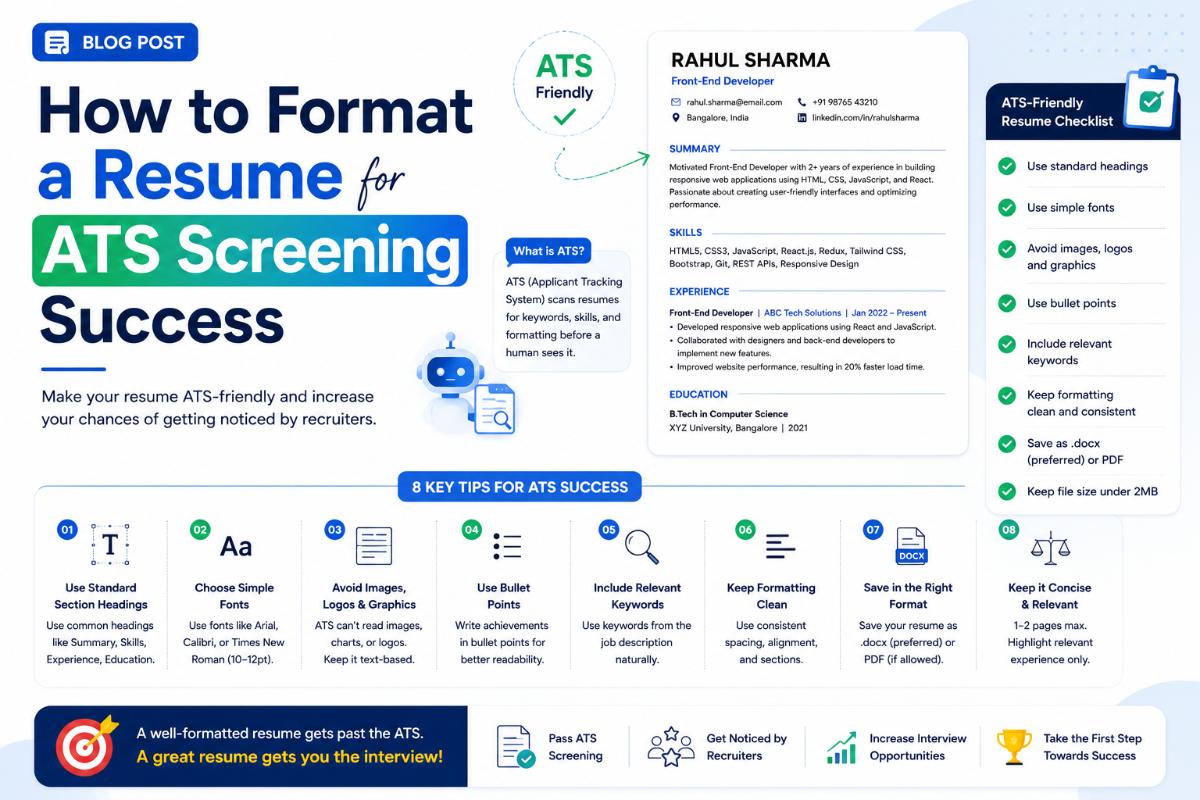
How to Format a Resume for ATS Screening Success
Understanding the Applicant Tracking System (ATS)
If you've been applying to jobs online and receiving instant rejection emails, your resume might be failing the Applicant Tracking System (ATS). An ATS is software used by employers to screen, sort, and rank resumes based on their relevance to the job description. If the ATS cannot parse your resume, it will never reach the eyes of an HR recruiter. Understanding how these systems work and formatting your resume accordingly is essential to landing interviews.
1. Keep Formatting Simple and Clean
The primary reason resumes get rejected by an ATS is parsing errors caused by complex formatting. ATS parsers are designed to read text in a linear, logical flow. To keep your layout parsing-friendly:
- Avoid tables, text boxes, and columns: Parsers often read tables horizontally across cells, scrambling your work history. Use a clean, single-column layout.
- Do not put contact info in headers/footers: Many older ATS systems ignore headers and footers completely, meaning they won't parse your phone number or email address.
- Avoid images, icons, and charts: Emojis, charts, and custom icons can confuse the parsing engine. Rely strictly on text.
- Use standard fonts: Stick to web-safe fonts like Arial, Calibri, Times New Roman, or Georgia.
2. Use Standard Section Headers
ATS parsers look for specific keywords to identify the sections of your resume. If you get creative with headers, the system won't know how to categorize your information.
- Use "Work Experience" or "Professional Experience" instead of "My Career Story."
- Use "Education" instead of "Where I Studied."
- Use "Skills" or "Technical Skills" instead of "My Superpowers."
3. Tailor Your Resume with Job Description Keywords
ATS systems score resumes based on how closely they match the keywords in the job description.
- Carefully read the job posting and identify recurring terms (e.g., "Project Management," "Python," "Agile Methodology").
- Incorporate these exact terms into your "Skills" and "Experience" sections. For example, if the job asks for "database management," write "database management" on your resume, not just "managing databases."
- Ensure you include both acronyms and spelled-out versions (e.g., "SEO (Search Engine Optimization)") to match whatever query the recruiter runs.
4. Choose the Right File Format
While PDF is the best format for preserving layout style when viewed by humans, some older ATS software parses MS Word documents (.docx) more accurately.
- If the job portal explicitly requests a Word document, upload a .docx file.
- If it accepts both, a clean, text-based PDF is usually safe. Avoid saving your resume as a scanned image (JPEG/PNG) PDF, as the system cannot read the text inside images.
Summary Checklist for ATS Success
- [ ] Single-column layout with no text boxes, charts, or tables.
- [ ] All contact details are placed in the main body, not headers/footers.
- [ ] Section headings are standard (Education, Work Experience, Skills).
- [ ] Resume contains exact keywords from the target job posting.
- [ ] File is saved as a text-searchable PDF or standard .docx format.
Written by JobPortal Editorial Team
Senior Career Advisor & Recruitment Specialist at JobPortalConnect. With years of experience in HR matching, they review resumes, optimize career pathways, and interview recruiting partners directly.